
Squarespace vs. WordPress: What's Best for Your Brand? (2026)

You’re ready to build a website that celebrates your brand and drives growth, but all the internet advice you’ve stayed up late reading has you torn. One tab’s saying WordPress is the only “serious” option, and another is assuring you that Squarespace is better for small businesses.
Let’s move past the generic pros and cons in the Squarespace vs. WordPress debate and break down what each platform looks like in practice, so you can choose the one that fits your business and its goals best.
Your Website Platform Matters More Than Ever in 2026
Think of your website as the digital home for your business. It’s the first place someone steps inside to see what your brand stands for, and whether you’re the right fit for what they need.
Both your website and the platform that hosts it impact audience behavior a lot. Choose a platform that fits your business, and your site becomes a quiet conversion workhorse. Pick something that doesn’t fit, and your site becomes a problem to manage instead.
Squarespace vs WordPress: The Quick Summary
Squarespace is an all-in-one website platform where hosting, design tools, security, and updates all live in one place. It’s streamlined and built with entrepreneurs in mind, so you can focus on brand clarity instead of managing technical details.
WordPress is an open-source content management system (CMS). It’s incredibly flexible and capable of building almost anything, but that flexibility comes with moving parts.
In simple terms, Squarespace is a self-contained platform designed for simplicity, while WordPress is a flexible, customizable system for large-scale sites and major customizations.
What Squarespace Is (and Who It’s Built For)
Squarespace is a website platform designed for business owners who want a beautiful, professional website without needing to learn the technical side of building one.
I love that everything works together behind the scenes, so your website can quietly do its job: introducing brand clarity and helping the right clients find you.
That balance of thoughtful design and everyday user simplicity is why service-based businesses, creatives, consultants, and small brands gravitate toward the platform.
What WordPress Is (and Why It’s So Popular)
WordPress powers a large portion of the internet for a reason. It’s highly customizable and capable of supporting complex websites with advanced functionality. Companies with extensive content or unique development needs rely on WordPress because it can scale alongside them.
That reputation for flexibility is why WordPress gets recommended so often. But here’s the truth I wish more people knew: most small businesses don’t need that level of infrastructure.
Which Platform Is Simpler Day-to-Day?

Squarespace: Built for Business Owners
Squarespace is designed for entrepreneurs who want control over their website without feeling like they need a tech manual on hand.
It’s built to grow with you. Whether you’re updating imagery after a rebrand or making small day-to-day changes, the editing experience is intuitive, so updates feel simple instead of stressful.
Behind the scenes, Squarespace keeps the technical pieces running quietly, so your website can do its job while you focus on running your business.
WordPress: Powerful, But Not Plug-and-Play
WordPress offers incredible flexibility and customization, but that level of capability also comes with a more technical setup. Sites rely on separate hosting providers and multiple plugins to customize pages and control design.
For businesses that need advanced functionality, that flexibility can be a real advantage. For many small businesses, though, that infrastructure is more than they actually need. What starts as maximum flexibility quickly turns into lots of maintenance and extra upkeep.
Design + Brand Experience
Beyond affecting how your site works, your website platform also shapes how easily and authentically your brand comes to life online.
Custom Builds vs Squarespace Templates
A fully custom build offers total creative control, but it also requires much more technical work. DIY-ing that process often comes with hidden costs, from time spent figuring things out to fixing issues later on.
Squarespace templates are built to save you that effort. Their modern design and simple editing process mean you can focus on layering in your brand rather than solving layout and design problems from scratch.
WordPress Themes (and Why They Vary Wildly)
WordPress themes run the gamut from stunning to chaotic. Some are beautifully engineered, but others are cluttered and difficult to customize without a developer.
That’s because WordPress relies heavily on third-party themes, so the design experience can vary dramatically depending on which theme you choose and how it’s implemented.
Which Platform Looks More Polished?
For most entrepreneurs, Squarespace wins here. Their in-house templates follow consistent design standards and work seamlessly within the system, allowing brands to come to life without wrestling with technical settings or unpredictable theme behavior.
Squarespace vs WordPress: The Real Cost Breakdown
Squarespace Costs
Squarespace pricing is refreshingly straightforward. Plans include hosting, security, updates, and design tools in one monthly fee. Business owners know exactly what they’re paying each month, which makes budgeting simple and predictable.
WordPress Costs
WordPress itself is technically free, but the ecosystem around it is not. Costs often include hosting, premium themes, plugins, developer support, and security services. Over time, those expenses stack up.
The Hidden Costs Business Owners Don’t Expect
The biggest cost surprise isn’t always money. It’s time. Managing plugins, fixing broken updates, and coordinating developers can quickly pull attention away from the work your business actually does. When a website starts demanding more energy than it gives back, it stops supporting your business.
SEO Myth: Does WordPress Really Rank Better?

You’ve probably heard that WordPress automatically ranks better on Google. The truth is that a thoughtful SEO plan is the bigger success driver than the platform you choose.
I’ve watched Squarespace’s SEO capabilities improve dramatically over the past few years. Now they’ve got built-in tools that support SEO strategies for small businesses, so you can optimize page titles, structure your site clearly, and create pages that search engines understand.
In 2026, SEO success comes down to the 3 C’s: clarity, consistency, and (useful) content. A well-structured Squarespace site can rank just as effectively as a WordPress site when the strategy behind it is solid.
Maintenance + Long-Term Simplicity
Let’s look beyond the initial build and evaluate which platform is best for upkeep.
Squarespace: Minimal Upkeep
With Squarespace, updates and security patches happen behind the scenes. There are no plugins to monitor and no software versions to manage. Your website quietly stays current while you focus on your business.
WordPress: Updates, Security, Plugin Conflicts
WordPress requires ongoing attention. Plugins need updates, and themes need maintenance. For businesses with development support, this is manageable. For solo entrepreneurs, it can feel like digital housekeeping that never quite ends.
When WordPress Makes Sense
WordPress shines when a website requires complex functionality. Membership platforms, advanced databases, custom web applications, or highly specialized integrations often benefit from the platform’s flexibility.
When Squarespace Is the Better Choice
Squarespace excels for streamlined small business websites. Service providers, creative professionals, consultants, and small brands often need something elegant, clear, and easy to maintain. Squarespace delivers exactly that.
Squarespace vs WordPress: Pros and Cons
Here’s my take on the pros and cons of each, laid out clearly for you based on what matters most.
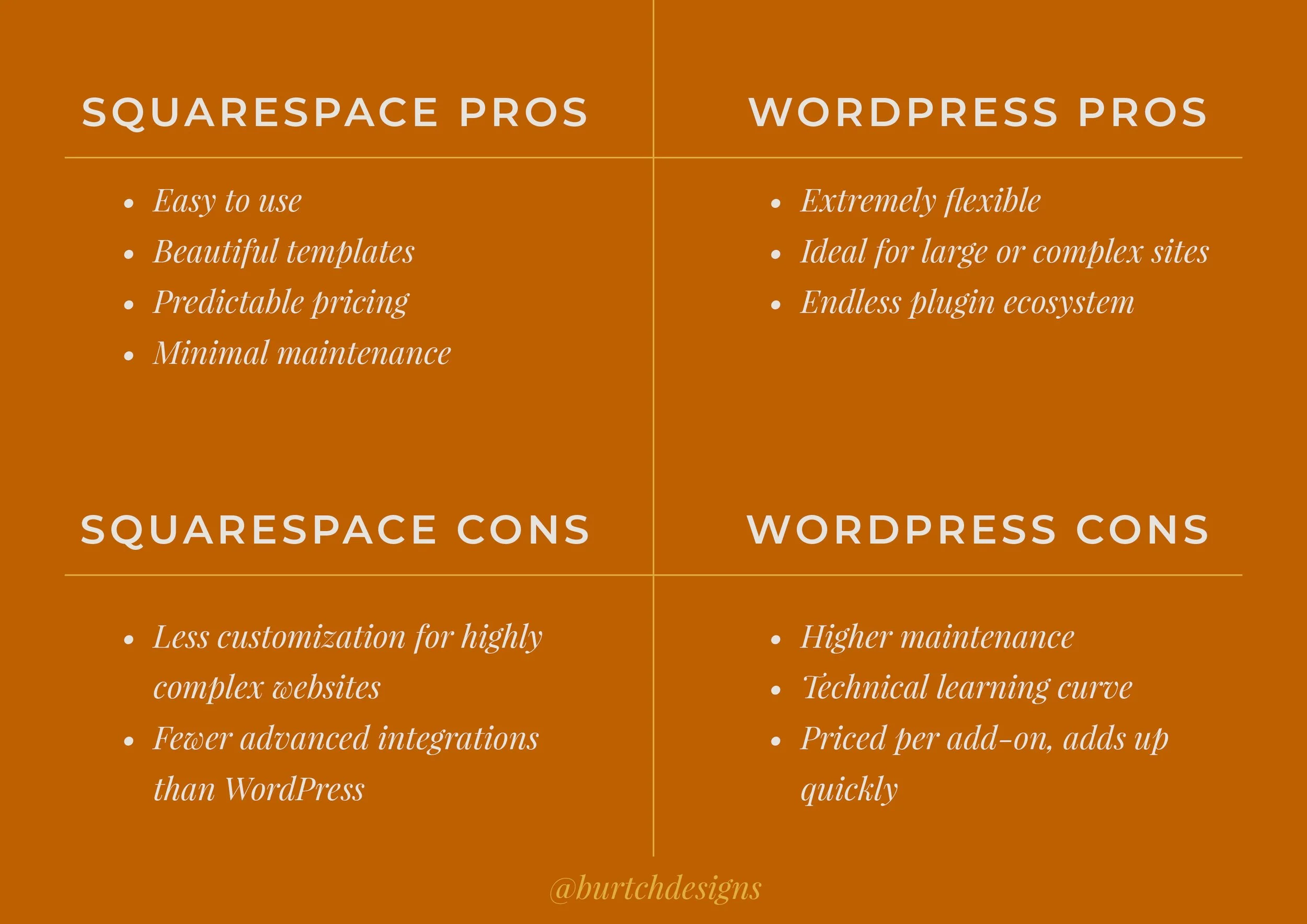
How to Choose the Right Platform for Your Business
Before choosing a platform, step back and assess what your business needs most. For most service-based entrepreneurs, the answers naturally point toward a streamlined platform like Squarespace.
But the right choice is always the one that aligns with your business goals and capacity. Ask yourself:
How comfortable am I managing technical updates?
Do I need advanced custom features right now?
Do I want to maintain this website myself long term?
How important is design and brand presentation?
Do I want simplicity or maximum flexibility?
Common Platform Mistakes Entrepreneurs Make
A common mistake I see entrepreneurs make is overbuilding their website too early. A new or small business rarely needs complex infrastructure, but many entrepreneurs jump into WordPress because they heard it’s “the only serious option.”
Another pitfall is diving into DIY website building without a guiding strategy and site map in place. Your website should reflect your brand clearly and confidently. When the foundation is strategic, everything else becomes easier.
Professional Design Saves You Time and Money
Many entrepreneurs eventually find themselves rebuilding websites that were overcomplicated or pieced together without a clear strategy.
Starting with the right platform and a thoughtful design process helps avoid those costly resets. When your website is built with intention from the beginning, it becomes a steady foundation your brand can scale with.
Work With a Squarespace Designer Who Gets the Big Picture
Your website should feel like a natural extension of your brand, while also supporting where your business is headed next.
That’s where working with me makes the difference. Instead of piecing things together yourself, you get a partner focused on building a thoughtful, polished website that reflects your brand from day one and stays easy to manage long after launch.
Squarespace vs WordPress: Frequently Asked Questions
Should I switch from WordPress to Squarespace?
Switching to Squarespace can simplify website management and reduce ongoing maintenance. If your current WordPress site feels complicated to update or maintain, Squarespace often provides a more streamlined alternative.
What are the downsides of using Squarespace?
Squarespace offers fewer advanced customization options than WordPress. Businesses that need highly complex functionality, custom databases, or specialized integrations may find WordPress more flexible.
Why are people moving away from WordPress?
Many people find that WordPress requires more ongoing maintenance than they expected. Managing plugins, updates, and security can quickly become time-consuming for businesses that simply want a website that works.
What is WordPress’ biggest competitor?
Squarespace is one of WordPress’ biggest competitors, especially for entrepreneurs and small businesses looking for a simpler, all-in-one website platform.
What is the #1 website builder?
There isn’t a single “best” website builder for every situation. For many service-based businesses, however, Squarespace is a popular choice because it balances strong design, ease of use, and minimal maintenance.

If you’re ready to stop second-guessing your website decisions and build a website that actually fits your business, I’m here. Schedule a consultation today.
