

I know you know how important your website is. It’s your digital identity, your main hub, your control center, and you want it to be perfect. But just how much does a new website cost?
Whether you’re going the DIY route with Squarespace or working with a pro web designer, you’ll want to know your price tag before you start building your online operating room. This guide breaks down website costs into 8 simple factors, so you can discover what matters most to you (and put your money where it counts!).
So, How Much Does a Website Actually Cost in 2026?
In reality, your perfect, user-friendly website can cost anywhere from $500 to thousands. You can create a DIY website or use customizable templates. You can hire a professional site designer and create a fully custom build! Either way, your price depends on how many pages you need, your design, copy, brand identity, content, platform choice, whether you DIY or hire a professional, and your overall needs. So, an “average cost” to create a website won’t cover the full story.
Website Platform Cost vs. Website Design Cost: They're Not the Same Thing

To understand your website's full price, first break down the cost into these two categories.
Your Platform Pays for the Technology
Part one of your payment is for your platform, which determines your website’s capabilities. This includes hosting, your content management system (CMS), security, and commerce features.
Your Designer Is Building the Experience
The second part of your price comes from your website's design. But! Design is more than looks. Design includes your strategy, UX, layout, and branding. It also decides content organization, conversion paths, and testing.
Why a $25/Month Platform Doesn't Mean a Website Costs $25/Month
One of the biggest misconceptions surrounding website pricing is that the flat rate you first see is what you’re actually paying. Platforms like Squarespace (although I love it), Shopify, and Wix charge flat rates for the core website technology. For things like domains, premium designs, and e-commerce features, they charge extra fees.
The 8 Factors Included in Your Website Cost
From designs and individual webpages to brand identity and content, your website cost breaks down into eight key factors.
Factor #1: How Many Pages Does Your Website Need?
The more pages you have, the higher your price. However, high-performing websites usually have at least 5 to 10 pages. 5-page sites generally work better for startups and smaller, more focused businesses. 10-page sites (which cost a few thousand dollars) are much better for distinct keywords and varied topics (recognized by SEO!).
The most common pages to include on your website are service pages, location pages, portfolios, and other content like an about section and contact page. However, beyond the number of pages, I always recommend putting proper care into each webpage.
Yes, SEO recognizes the number of pages you have, but more importantly, it picks up on the quality and clarity of your site. Confusing or fluff-heavy pages will leave you with a slow-loading, underperforming site.
Factor #2: Are You Using a Template or Creating a Custom Design?

Fully custom-built websites can quickly exceed prices of $30,000. This is due to advanced integrations across your site and unique backend systems. For some, this is necessary. For others, a template or a customized Squarespace site may be all you need (with a much lower price tag!).
Remember! Template websites have set-in-stone places for your copy, graphics, and other design elements. In contrast, a Squarespace website allows you to move and adjust these elements with more customization.
Factor #3: Who Is Writing Your Website Copy?
It might not seem like it, but your copy should inform your website’s design. This guarantees everything fits the first time, avoiding extra costs in maintenance, time, and scope changes.
Writing your own copy saves you money upfront and helps you feel familiar with all areas of your business, but it can quickly become a task that feels untimely and unmanageable. This is when I recommend working with a professional copywriter.
Professional copywriters charge a fee, but they know the keywords, calls to action, and consumer-focused language that make your copy sing to SEO and to returning customers.
Factor #4: Do You Already Have a Strong Brand Identity?
Your brand and web design work together to make your website look intentional and build trust with your audience.
When you design with an established brand identity, you already have the colors, fonts, graphics, and themes in place. Using these elements creates visual consistency and saves time by instantly communicating your business and brand to viewers.
I have also worked with clients who are still building or redesigning their brand before they make their website. When doing so, I recommend prioritizing the core of your business (making sure that comes across clearly) and establishing the voice of your copy. Make sure to cross all of your t’s and dot your i’s in this process to avoid any future rebuilds and added costs!
Factor #5: What Does Your Website Need to Do?
The more your site needs to do, the more planning, setup, and testing the project requires, which raises your overall costs. Lead-generation sites with contact forms are usually the lowest-cost websites available. Email marketing, CRM integrations, scheduling, and appointment booking are a bit more complex.
If you need e-commerce and payments, memberships, courses, or digital products, you'll need a website with high-level integration and connectivity, which costs more.
Factor #6: What Content and Photography Do You Already Have?
One effective way to cut the cost of your website is to use the photography and graphics you already have (that align with your brand, of course). If you don’t have these items, stock photography can help, but it may be time to look into custom graphics and professional brand photography!
Gathering content like this will add costs because it increases your project scope, but it will likely save you time and money in the long run. Plus, it increases your brand identity!
Factor #7: Which Website Platform Are You Using?
One of the biggest factors I recommend considering is your platform. The big three are Squarespace (predictable costs and easy ownership), WordPress (more flexibility and more moving parts), and Wix (an accessible entry point with different scaling considerations).
Squarespace vs. WordPress vs. Wix: Quick Cost Comparison
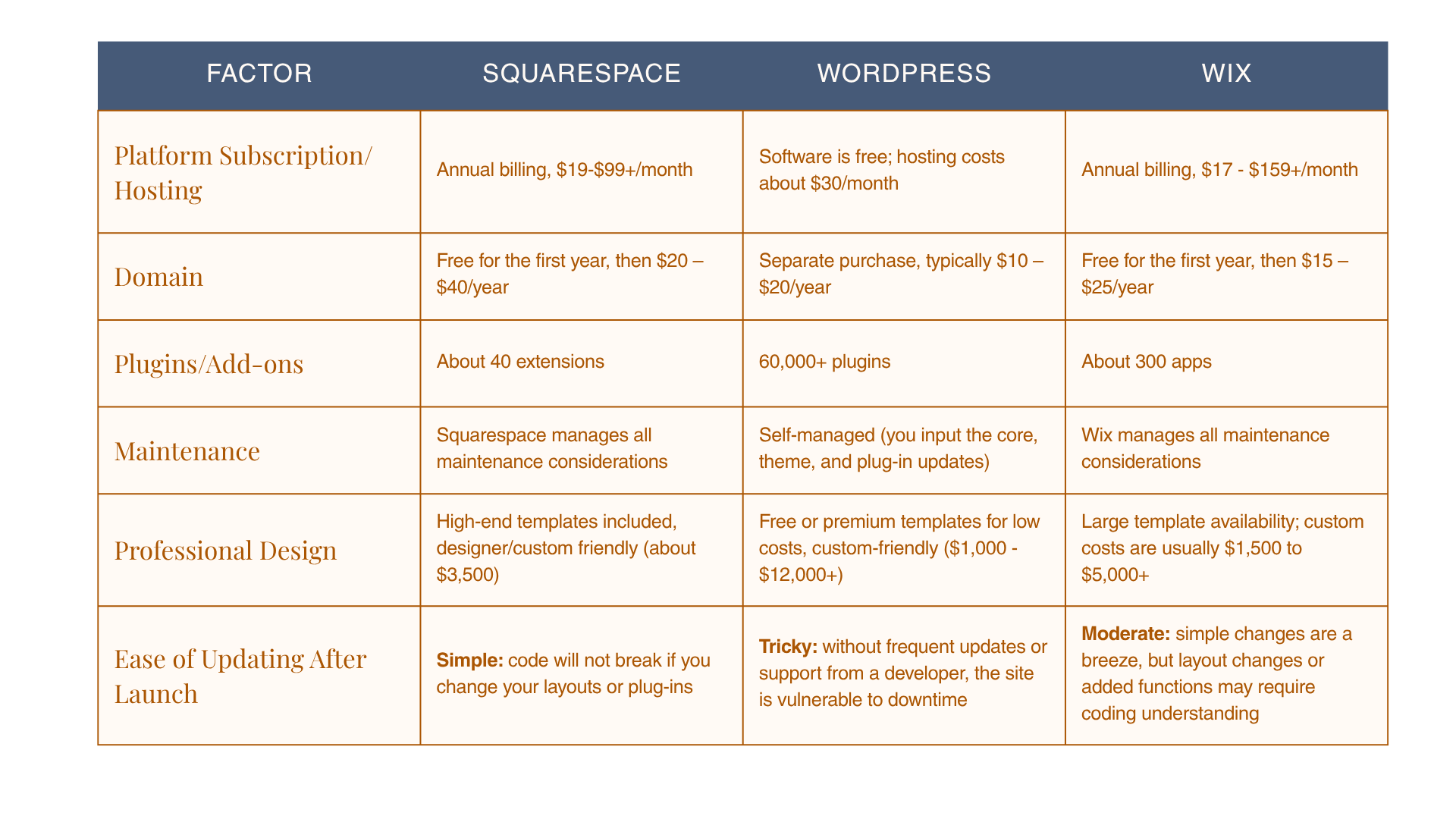
Factor #8: Are You DIY-ing or Hiring a Professional?
How much does a professional website cost? This last factor determines how you want to spend your time, money, and resources. If you choose the DIY route, you will likely see lower upfront costs! However, you may pay more for plug-ins, needed features, or advanced design templates.
Most importantly, DIY websites also cost time. You’ll likely need some coding knowledge and hours to fine-tune details and graphics. Plus, maintenance likely falls on your shoulders.
When you explore professional website designer costs, remember you’re paying for more than a pretty layout. You are paying someone with the experience, knowledge, and tools to efficiently build and connect your strategy to the visual online heart of your business.
When DIY Makes Sense—and When You've Probably Outgrown It
When you're just starting your business, chasing leads and getting the word out, DIY is a perfect way to start building your website! It gives you control and lets you build your brand from the ground up.
When technology starts getting in the way, time starts running thin, your leads are turning into clients, or if you simply need a new website to keep growing, it's probably time to hire a professional designer. How exciting!
Don't Forget the Costs That Come After Launch
Great, you've uploaded your site! What costs come next?
Domain Renewal
I wish it were a one-and-done deal, but renewing your domain usually costs $10-$35 a year. Some platforms may charge a different starting fee than their renewal fee, but others like Squarespace are relatively predictable.
Platform or Hosting Fees
Some platforms offer trial or intro pricing periods that may change as you keep your website uploaded. These charges are monthly and cost roughly $20 to $ 100+.
Email & Scheduling Tools
A branded email domain and scheduling tools are often monthly costs. These items are popular additions to more automated websites and typically add about $25 per month.
Third-Party Software
Some niche or industry-specific additions might require specific analytics, automation, or CRM software, which usually costs between $5 and $50 a month.
Website Updates & Maintenance
Maintenance and regular updates are a part of upkeep for every website. (Squarespace sites generally have a lighter maintenance burden.) If you have a site with more pages and add-ons, you’ll likely spend closer to $1,000 on updates, whereas smaller websites can cost just $10-$15.
How Much Should You Spend on a Website?
With all of the custom elements, don’t base your budget on other businesses. Start with what you need your site to accomplish.
If You're Just Getting Started
If you’re running a small business or a start-up, you could probably get away with spending a few hundred (or a few thousand) dollars to build your site and plan to spend a few hundred on maintenance for the year.
If Your Business Is Established but Your Website Isn't
Creating a business website will likely feel like building a second storefront that aligns with your current brand identity and includes e-commerce and payment features. You should generally be prepared to spend around $2,000 to $10,000 for a site like this.
If Your Website Is Responsible for Generating Leads
A lead-generating website will often require frequent updates to content and email marketing. I recommend budgeting $10,000 to $50,000 upfront, plus a few hundred dollars in ongoing maintenance.
If You're Rebranding or Entering a New Stage of Growth
You can expect to spend the most on your new website if you’re approaching it alongside a rebrand. This can cost several thousand dollars (possibly $50,000+) because of new content gathering and updated, integrated brand features.
Ready to Stop Guessing What Your Website Needs?

You work hard for your business, and your website should work hard for you. I’m here to design strategy-led Squarespace websites that get you just the growth and recognition you need. Tell me about your website project and let's get started!
Frequently Asked Questions About Website Costs
How much does a basic website cost in 2026?
A basic, 5-page website often has a price tag of a few hundred dollars to a few thousand, depending on the size of your business.
How much does a professional small business website cost?
Professionally designed small business websites usually cost between $1,000 and $5,000. With premium features and more customization, they can cost closer to $10,000.
How much does a 10-page website cost?
A 10-page website can cost anywhere from $5,000 to upwards of $12,000. If you choose the DIY route, you can spend less upfront, but you may pay more in time and resources later.
How much does a Squarespace website cost?
Squarespace charges monthly for its services. Depending on your plan, you can pay between $19 and $99+ per month.
Is it cheaper to build a website yourself?
In some ways, a complete DIY website can be cheaper. But! You will likely see the costs of time and maintenance, copy, content, programming, and domain fees stack up.
How much does it cost to hire someone to build a website?
Depending on the partner you choose, a professional web designer can charge anywhere from $5,000 to $10,000 or more. For larger projects where you work with a team, it’s not uncommon to see prices between $30,000 and $50,000.
How much does it cost to maintain a website each year?
For smaller websites, maintenance costs usually run a few hundred to a thousand dollars, while bigger websites may cost around $8,000.
Is Squarespace cheaper than WordPress?
Squarespace is generally considered cheaper than WordPress because its cost to build a website already includes templates, hosting, and core features.
