

Your business has grown, but has your website kept up? Your small business website needs to do more than sit and look pretty; it needs strategy! But what does that really mean?
From branding and messaging to user experience, structure, and design, this guide walks you through the strategy behind successful small business websites, so you can build your own site that not only looks professional, but also works to attract customers.
What Is a Small Business Website?
A small business website is a central hub that showcases a company’s mission, goals, products, and services to grow your audience and provide information. It’s different from an online brochure, meant to make an immediate impact. A successful business website, built to support your goals, is alive.
It keeps your audience engaged with interactive features and provides information that keeps your business top of mind. Common site types include service-based, portfolio, lead generation, and e-commerce.
Why Small Businesses Still Need Websites in 2026
Even in a world swarmed with social media, your website is your online headquarters, serving as a 24/7 connection to your audience. A good website strengthens your brand identity and your business authority. Plus, it's the landing pad for all your other marketing!
Your Website vs. Your Social Media Presence
Social media humanizes you and helps your audience find you. It lets your personality shine and directs people to your website. Your website establishes trust in your brand. Together, they help your audience take the next step, whether that's scheduling a consultation or making a purchase.
What a Professional Website Should Actually Do for Your Business
Your professional website should be fueled by strategy. Beyond a flattering look, it should help drive the growth of your business and act as the centralized hub for all of your other communications (email, socials, word of mouth).
What Makes a Good Small Business Website?
A successful small business website doesn’t have to be overly elaborate or complicated. It simply needs to be intentional and informational.
Clear Messaging That Explains What You Do
First and foremost, prioritize clear, easy-to-understand website copy. This guarantees your audience understands your brand, business, and any purchases they may make.
A Professional, Consistent Brand Identity
As I’ve mentioned, your website is another chance to strengthen your brand identity. Your brand’s colors, logo, voice, and personality should be highlighted on your website and match how your brand appears elsewhere.
Simple Navigation and User Experience
No one likes a website with too many pages or one that doesn’t work correctly. When building your site, remember to keep layouts clean and navigation simple so your audience can get to know your company (without the roadblock of bad UX!).
Mobile-Friendly, Accessible Design
Speaking of UX, remember that consistency matters across devices as well as platforms. As you design, remember to plan for how your site will look on both laptops and smartphones!
Strong Calls to Action
A main goal of your website is to have your audience follow through. Strong CTAs help most of all. Encourage your audience, make a claim, and build a connection!
Helpful Content That Builds Trust
When your website content looks thoughtful, is easy to navigate, and aligns with your brand, it shows your audience they can trust you and establishes your authority.
What Pages Should Every Small Business Website Have?
What should a small business website include? Well, not every business needs the same pages, but simple, effective ones often work best!
Homepage: Make Your First Impression Count
Are you playful? Fully professional? A mix of both? Your homepage is your audience’s first glimpse into how you professionally present yourself. Show them who you are!
About Page: Give People a Reason to Trust You
Your About page is your chance to let your audience in. After your homepage gives them a visual clue, tell your audience what you’re all about. Why did you start your business? What are your values? Your audience wants to know!
Services Pages: Explain How You Help
They may have some idea, but a detailed description of your business and the products or services that you offer is always helpful to your customers. Service-specific pages are most useful when they answer distinct customer needs.
Portfolio or Testimonials: Show Your Work
A portfolio or client testimonials are essential parts of any successful small business website. Including these items backs up all of the other content you put out there about your business and really hammers in the trust factor.
Contact Page: Make Taking the Next Step Easy
Something simple and easy to look at is perfect for your contact page. Make your contact information clear so your leads always know where to go next!
Blog and FAQ Pages: Answer Customer Questions
You. A blog page does more than add flair; it keeps your business fresh and at the top of search engine results. Pair this with an FAQ page, and you'll not only have an SEO-friendly website, but your audience will find all their information in one place!
Privacy Policy and Other Relevant Legal Pages
Aside from the legalities of privacy policy pages, these pages show your audience your commitment to service and protecting their privacy (essential to building a relationship with your clients!).
How to Build a Small Business Website: 8 Steps
Now that you understand the behind-the-scenes work a website does, you want to know how to create a small business website. The good news? It’s not as hard as it seems!
Step 1: Define Your Website's Purpose and Audience
When you start with a defined purpose, everything else about your site falls into place! Each page aligns with your business goals and keeps confusion out of your clients’ heads.
Step 2: Clarify Your Brand Identity and Messaging

While we’re on the clarity train, make sure your brand identity and messaging match your social media, print, and any other spaces where your identity already exists. This cements your unique look in your audience’s mind.
Step 3: Choose Your Website Platform
Once you know what you need your small business website to do, pick the platform that makes it easiest to set up (my personal favorite is Squarespace, but more on that later!).
Step 4: Plan Your Pages and Navigation
Next, lay out the service areas and different pages you hope to highlight. Prioritize what helps the client most and map out clear navigation to keep them engaged while on your site.
Step 5: Write Helpful, Customer-Focused Website Copy
Yes, your audience wants to know about your business, but they also want to know what you can personally do to help them, so tell them! Throughout your website, write engaging copy that makes every client feel heard and cared for.
Step 6: Design for Desktop and Mobile
As I’ve previously mentioned, plan for how your website will look on both laptops and smartphones. If one or the other is misaligned, cuts off copy, or doesn’t match your brand, it can disrupt your business identity and leave your leads distrustful of your products or services.
Step 7: Set Up SEO, Analytics, and Website Functionality
Just like monitoring your engagement on socials, set up systems to track the engagement on your website! You want to know how search engines rank you, and if there are any UX bumps, so it’s always a good idea to set analytics up before your website is live.
Step 8: Test Everything Before Launch
Arguably the most important step, test everything! Use a site like PageSpeed Insights. Preview your site on all devices, make sure each button and tab works properly and directs to the right page, and make sure your contact page actually contacts you!
What's the Best Website Builder for Small Businesses?
Professional small business websites are all unique. Finding the best website builder for yours is just one part of the process!
Squarespace: Jackie's Favorite for Service-Based Businesses
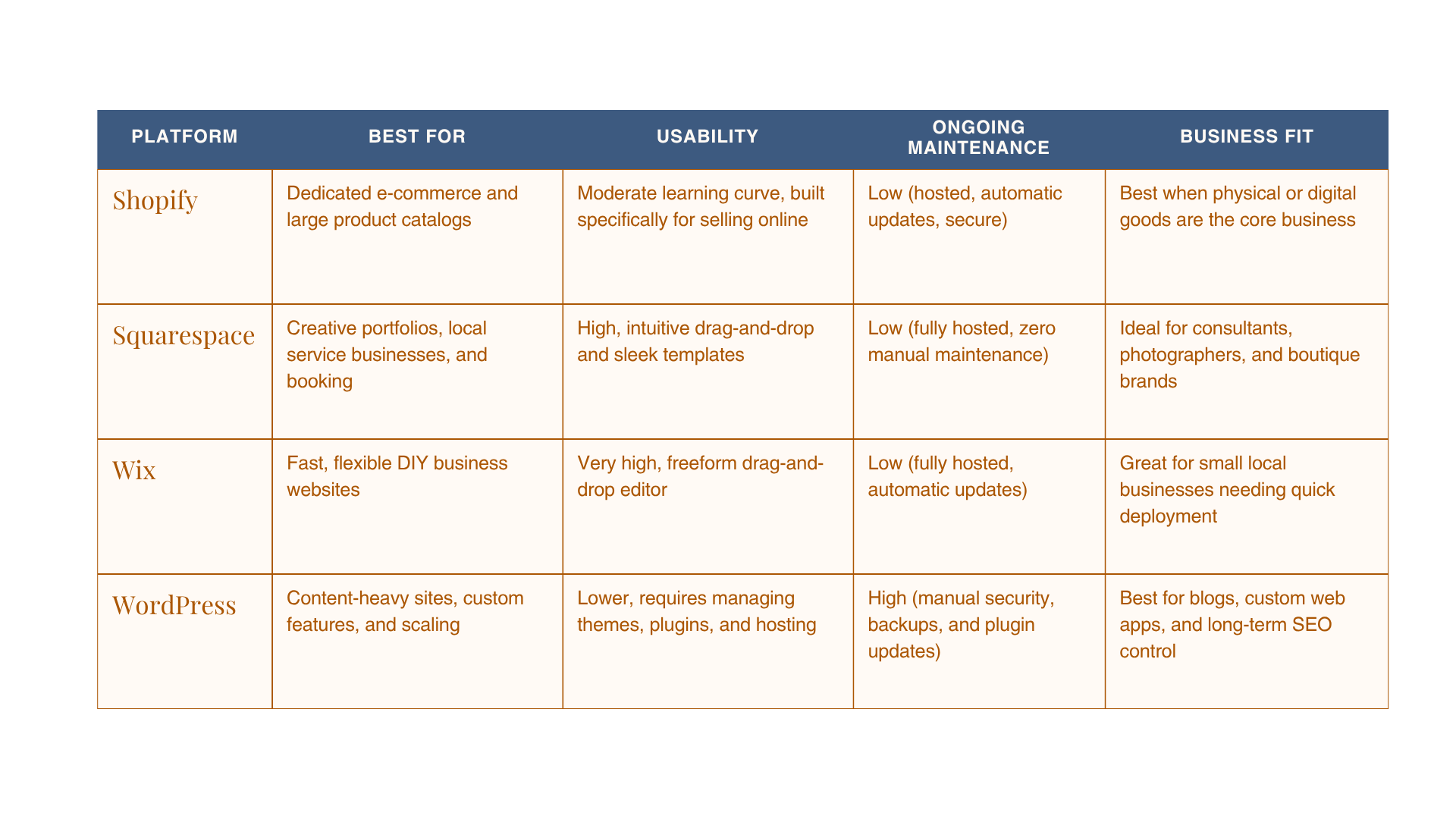
For service-based sites, I find Squarespace is the best website builder for small businesses. It’s an affordable platform for business owners who want a beautiful website without worrying about the technical side of building it.
WordPress: Flexibility for More Complex Websites
WordPress is more expensive than Squarespace, but it offers strong customization and can run complex, high-functioning websites. Most small businesses don’t need that level of support, but if you need extensive content and unique development, it’s the way to go!
Wix: A DIY-Friendly Alternative
If you need quick updates and are planning a simple site, Wix is likely your best bet. It’s easy to use and very budget-friendly, but it has limited scalability for long-term businesses.
Shopify: Built for Product-Focused Businesses
Shopify sites are built for e-commerce. If your company has a large product inventory and you’re looking to launch your online storefront, Shopify can offer both brand customization and the e-commerce features your audience wants.
How to Choose the Right Platform for Your Business
Why I Recommend Squarespace for Small Business Websites
All that said, I recommend Squarespace to my clients for its ease of access, room for growth, and design capabilities.
Professional Design Without Unnecessary Complexity
In my time working with Squarespace for small businesses, I've found it doesn’t try to do more than it needs to. The finished designs can look complete, artistic, and professional, but it doesn’t overcomplicate the process of getting your site to that point of satisfaction.
Easy Updates After Your Website Launches
Once you post your site, you’re going to need to edit it at some point. Squarespace makes this process easy, allowing for fast updates and an always-live site.
Built-In SEO and Website Management Tools
Some of my clients find SEO and management tools overwhelming. Squarespace, however, includes these tools, eliminating overwhelm by keeping everything you need to monitor in one place.
Room to Grow With Your Business
Squarespace is built to grow with you. Whether you’re adding new pages or making day-to-day changes, the updating process is intuitive and simple, not stressful.
When Squarespace Isn't the Right Fit
While it is my favorite, Squarespace won't work for every business, and that’s okay! If your website needs complex functionality or deep customization, WordPress might be a better fit. If your main goal is e-commerce, an option like Shopify might deliver better results. It all comes down to what you need your website to accomplish.
Small Business Website SEO: How Do Customers Find You?
I’ve mentioned that social media directs your leads to your website, but where else are they coming from?
Start With the Keywords Your Customers Actually Search
Rather than trying to impress with industry jargon, find and include keywords your clients are actively searching for in your site copy.
Give Every Page a Clear Purpose
To help search engines match specific asks, give each of your service or product pages a singular, clear job to communicate.
Write Descriptive Titles, Headings, and Meta Descriptions
Place keywords early and often in your website copy and keep headlines clear to rank higher in search engine results.
Use Internal Links to Connect Related Pages
Audiences and algorithms alike love internal links. They keep your content and services connected and guide viewers through your website in a natural flow.
Optimize Images, Mobile Usability, and Loading Performance
Customers find you best when your site works properly. Compress images, add alt texts, and double-check that your site works on mobile devices.
Build Trust With Real Experience, Testimonials, and Business Information
Display customer reviews and photographs of your work to show your real project and product experience visually.
Make Your Website Easy for Google and AI Search Tools to Understand
AI search visibility comes from useful, well-organized, credible, and accessible content. Keep your headings clear and write direct content that is most easily recognized by search engines.
How Much Does a Small Business Website Cost in 2027?
Your small business website cost can be anywhere from $500 to thousands. It’s all about what site you pick and who you pick to make it.
DIY Website Costs
DIY websites save money upfront, but they have added costs in time and energy. Plus, you’ll likely have to pay more for plug-ins, needed features, or advanced templates.
Professional Website Design Costs
When working with a designer, you’re paying someone already equipped with the time and tools to build your ideal small business website. Costs are higher upfront, but you save on time and energy, and you don’t have to maintain the website entirely on your own after launch.
What Affects Your Website Budget?
Your website budget is determined by the number of pages you need, the depth of your customization, the site you use to build, your content, and your overall business goals (e-commerce vs. service-based).
Ongoing Website Costs to Plan For
Domain renewals, hosting fees, software add-ons, and website maintenance are all common costs after you launch your website.
DIY vs. Hiring a Small Business Website Designer

Website design for small businesses isn’t one-size-fits-all. You might want to DIY your digital space fully, or you can have someone to help along the way!
When Building Your Own Website Makes Sense
When your business is new, doesn’t involve complex coding, and you’re chasing new leads, a DIY website might be the way to go!
When It's Time to Hire a Professional
If you’ve been around for a while, technology is getting in the way, or you simply don’t have time to manage a website, a professional designer may be just what you need.
What You're Really Paying a Website Designer For
With a designer, you’re not just paying for a pretty design. You’re paying for someone to connect your current strategy (or help you build a new one) to your online presence so clients remember you and your company feels established.
Questions to Ask Before Hiring Someone
Make sure your designer is the right fit! Ask to see a portfolio, ask about their experience, and stay updated on their availability.
Common Small Business Website Mistakes to Avoid
With all the moving parts of web design, these easily avoidable mistakes are the ones I see happen most.
Designing Before Clarifying Your Message
A misguided design leads to misguided clients (that’s the last thing you want!). Set your business goals and target audience in stone before you even pick your color palette.
Using Too Many Fonts, Colors, or Visual Styles
Overcomplicating your design overwhelms your audience. Keep your design simple and clear to maintain understanding.
Making Visitors Search for Your Services
You don’t want to hide what you have to offer! Make each of your service pages apparent and easy to find.
Forgetting About Mobile Users
Some people will find you on a computer; others, on their smartphone! Remember to design for both sets of eyes.
Ignoring SEO Until After Launch
SEO starts while you design. Keep in mind how search engines will receive your content and copy from the moment you start designing.
Hiding Your Contact Information or Next Step
Your audience is on your website looking for direction; give it to them! A transparent contact page helps you feel approachable and welcoming.
Launching and Never Updating Your Website
It’s inevitable: your business will change after your website launches. Make sure to revisit your site to guarantee that your services and offers are always up-to-date.
Small Business Website Examples: What Can You Learn From Real Businesses?
These small business website examples (some of which I completed myself) are projects I personally find both inspiring and successful.
Example #1: A Service-Based Business Website
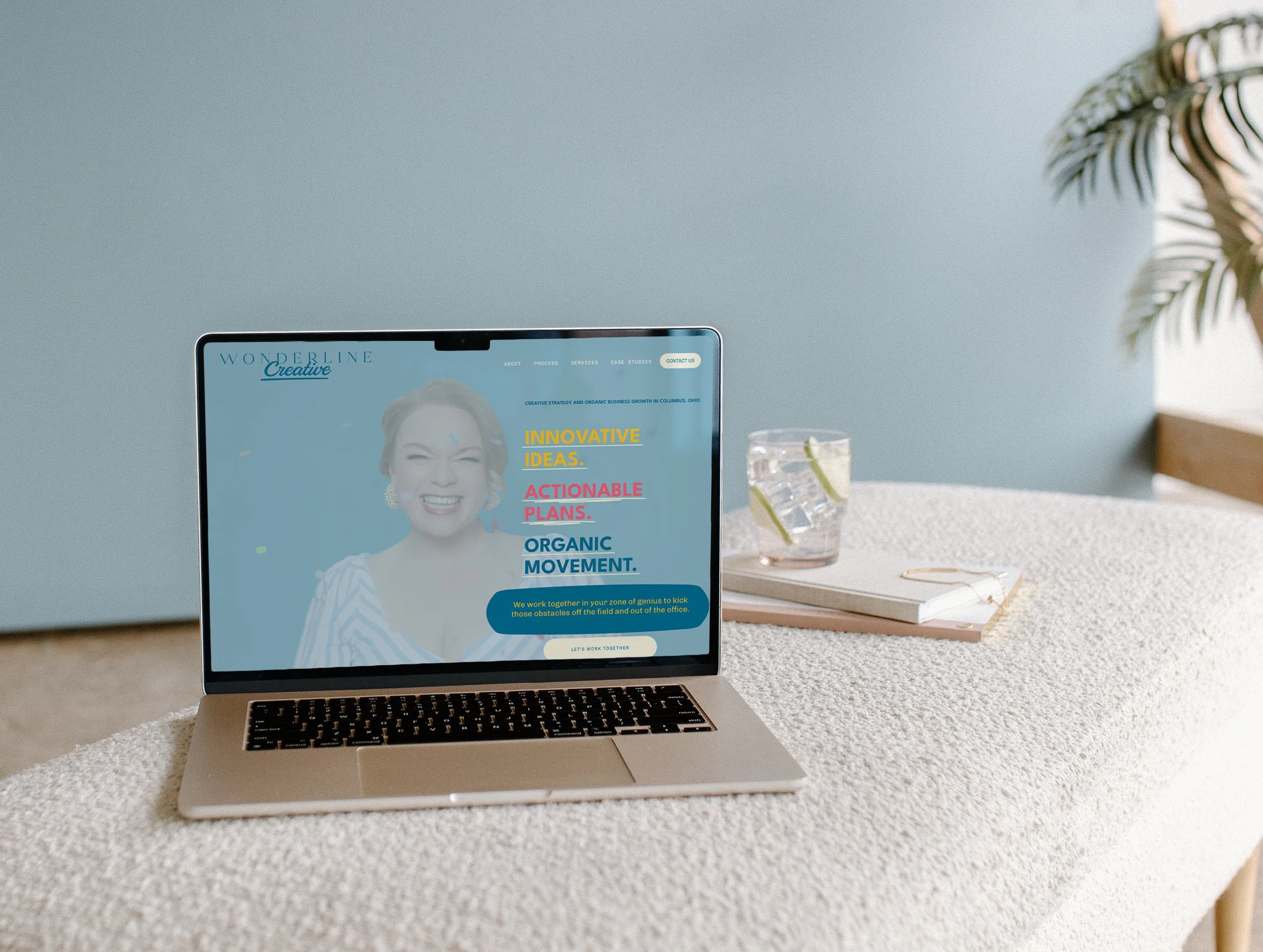
Service-based businesses need to make offerings stand out and easy to understand. While working on Wonderland Creative, I chose bright colors and exciting pictures to represent the brand while leaving room to differentiate pages. With sites like these, differentiation (especially with your calendar) is central to keeping things clear to the client.
Example #2: A Creative Portfolio Website
Portfolio websites are meant to highlight work with an artistic flair. The goal is immediate impressions and a clear way to contact the artist. The color choices and personal branding of these sites are absolutely worth learning from!
Example #3: A Business With Multiple Services

The goal for Labyrinth Health Integration was to create a unique but unified therapy and life coaching site that stood out from the rest. I used bright colors alongside calm tones to emphasize the brand’s values of growth and connection.
Also, with multiple therapy services offered, it was important to keep their newly original look consistent across each page. After all, design consistency signals consistent care to your audience, showing how important your website really is!
Small Business Website Checklist: Are You Ready to Launch?
When you think your website is complete, make sure you've checked off each consideration on this small business website checklist:
Brand identity and messaging
Core website pages
Navigation and calls to action
Mobile testing
SEO titles and descriptions
Image optimization and alt text
Contact forms and scheduling links
Analytics and search indexing
Accessibility checks
Privacy and other applicable policies
Final proofreading and link testing
Ready for a Small Business Website That Works as Hard as You Do?

You work hard to grow your business. You deserve a website that shows off your hard work! I’m here to build you a strategy-led Squarespace site that's ready to get your business growing. Let’s talk about your website, find you the design package that fits your goals, and get started!
Small Business Websites: Frequently Asked Questions
Does a small business really need a website in 2026?
Yes! While social media helps with exposure, a website strengthens your bond with your audience by building credibility and trust.
What should a small business website include?
A small business website should include a home page, an about page, service pages, a portfolio/testimonials, privacy policy pages, and a blog/FAQ section.
How much does it cost to build a small business website?
A DIY small business website usually costs a few hundred dollars but comes with time and energy taxes. If you use a professional designer, you will likely pay a few thousand dollars but save on time.
What is the best website builder for a small business?
With affordable costs, accessible designs, and many in-site analytics tools, Squarespace is always my first recommendation for small business websites.
Is Squarespace good for small businesses?
Yes! Squarespace is a versatile website option for small businesses. It is especially useful for service-based and creative businesses.
How many pages should a small business website have?
It depends on your specific needs, but small business websites typically have about ten pages.
Can I build my own small business website?
Yes! If you have time, energy, and brand identity ready to go, a fully DIY small business website is a good option. However, if you’re short on time or in need of design advice, a professional designer might be right for you.
How long does it take to build a professional website?
A DIY website can take a few days to a couple of weeks to build, while a professional website usually takes 4 to 12 weeks before its official launch.
How do I get my small business website to show up on Google?
Verify your site, post regular blog updates, and write copy with audience-searched keywords to boost your website's recognition on Google.
Should I hire a professional website designer?
Yes! A professional designer has the tools, experience, and knowledge to connect your brand identity to your website and create unique, brand-aligned designs.
